
Helium 10 Review & Buyer Guide: Is It Worth It?
We tested Helium 10’s native research tools and its MCP / ChatGPT connection on October 17, 2026. The session showed useful access to real research data—and one important loss of parent-versus-ASIN context in a conversational result.
Hands-on session and review update: October 17, 2026 · Amazon US research
Toolessence may earn a commission if you buy through our links, at no extra cost to you. A partner offer does not change our findings. Promo availability and terms may change; verify the discount at checkout.
Quick verdict
Helium 10 is worth considering for Amazon sellers who need product research, keyword analysis and listing evaluation together. Our native spot checks supported specific ChatGPT results, but the connector did not preserve metric scope in one product example. Use conversational output to explore research, then return to native tables before making a buying or sourcing decision. This session does not establish profitability, general accuracy or value across the whole suite.
What Helium 10 is and who it is for
Helium 10 is an ecommerce seller platform with tools for product discovery, keyword research and listing analysis. Our evaluation concentrates on Black Box, Cerebro, Listing Analyzer and conversational access through ChatGPT: a research workflow rather than a complete seller-operations audit.
The interface also showed listing, advertising, analytics, operations and learning resources, including Freedom Ticket, plus Amazon, TikTok and Walmart workspaces. These are interface observations—not confirmation that we used every feature, completed the training or tested marketplace outcomes.
The strongest buyer fit is someone who will repeatedly combine several research tools, rather than buy a broad subscription for a single lookup. See the Helium 10 tool profile for a concise overview.
Our hands-on testing methodology
The evidence is a focused session captured October 17, 2026, using an account showing Diamond. We ran live product-research and reverse-ASIN queries with Helium 10 enabled in ChatGPT, then checked selected outputs in the native tools.
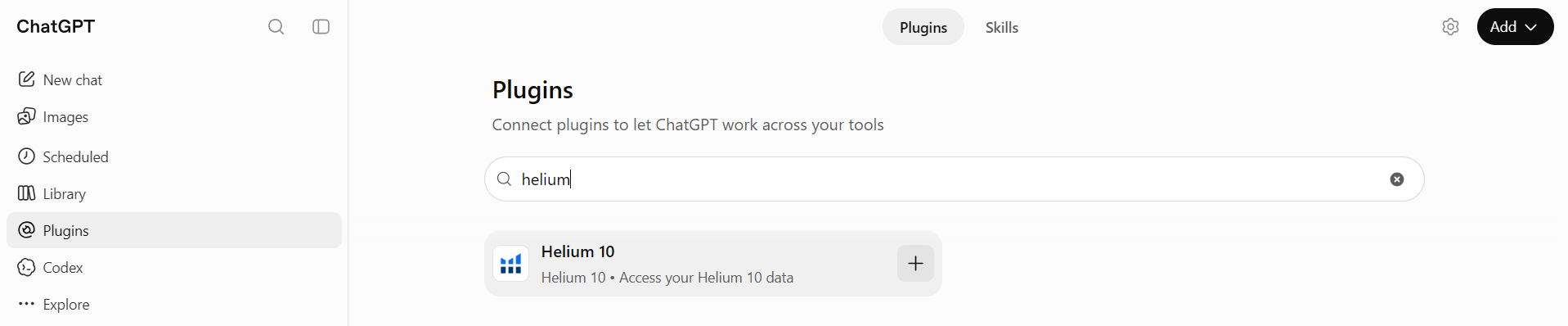
- Find and connect Helium 10 in ChatGPT’s Plugin Directory, including the connection-permission step.
- Run product research and reverse-ASIN / keyword queries inside ChatGPT.
- Test native Black Box on Amazon US with a $20–$50 price range and fewer than 500 reviews; sort results by ASIN Revenue.
- Spot-check two keyword examples in native Cerebro and inspect ASIN B0FJMPHMBN in Listing Analyzer.
- Compare metric labels, not just numbers, and record workflows we could not access.
Our screenshots document the actions and values described here. They are not a controlled accuracy study, verified seller sales, a comprehensive plan comparison or proof of business results. Vendor setup pages and sample-data demonstrations are separate from the live outputs.
Product Research / Black Box
We used native Black Box with Amazon US selected, prices between $20 and $50 and review counts below 500. We also sorted results by ASIN Revenue to compare the native research view with the product-research workflow inside ChatGPT.
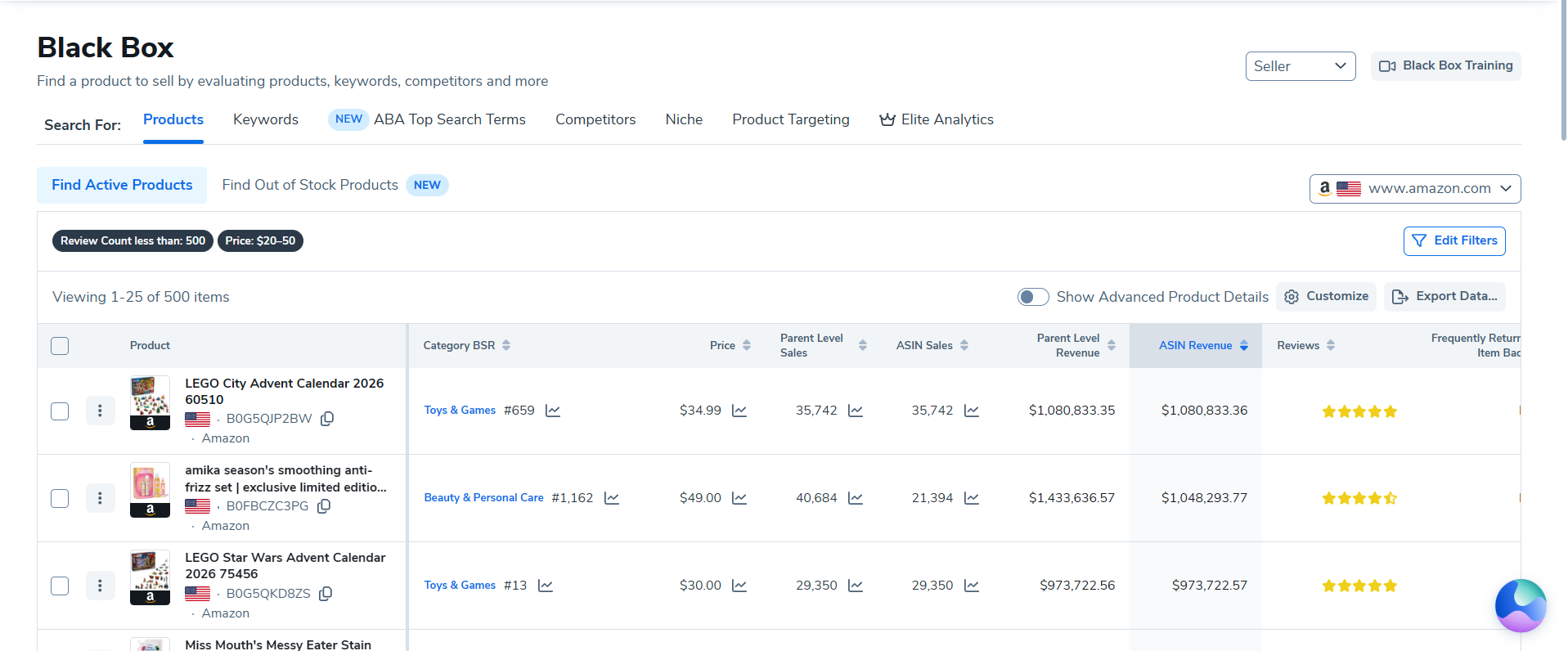
The useful part of this workflow is a filtered shortlist with explicit columns. It gives the buyer a way to inspect candidate products rather than accept an unexplained recommendation. The native table also makes it possible to notice distinctions between parent-level and ASIN-level estimates.
A product appearing in these results is a research lead, not a validated opportunity. We did not source these products, establish margins or test their commercial performance.
Cerebro and keyword research
We compared selected reverse-ASIN keyword values from ChatGPT with native Cerebro. Two concrete examples matched:
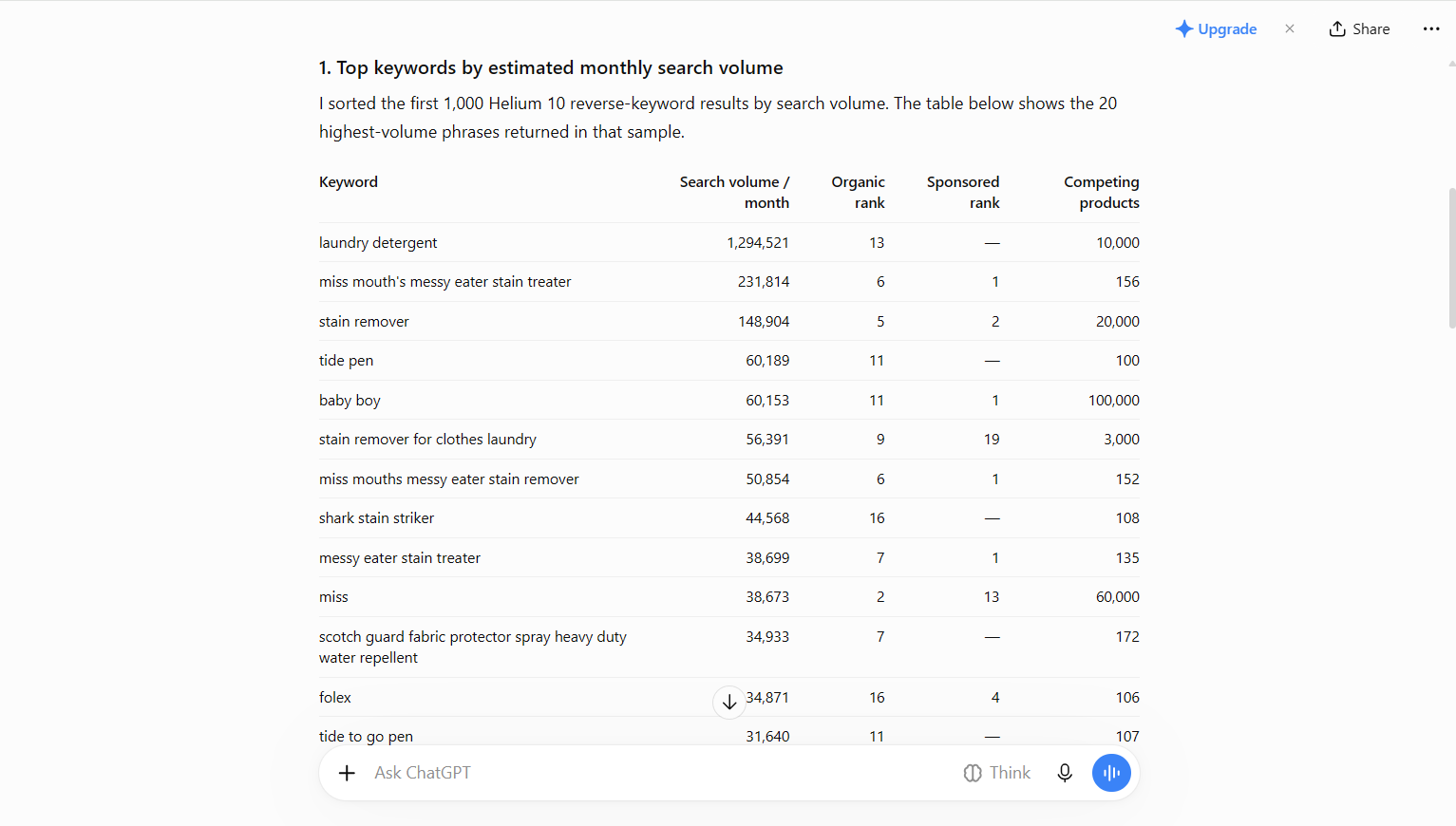
- “laundry detergent”: search volume 1,294,521.
- “miss mouth’s messy eater stain treater”: search volume 231,814 and 156 competing products.
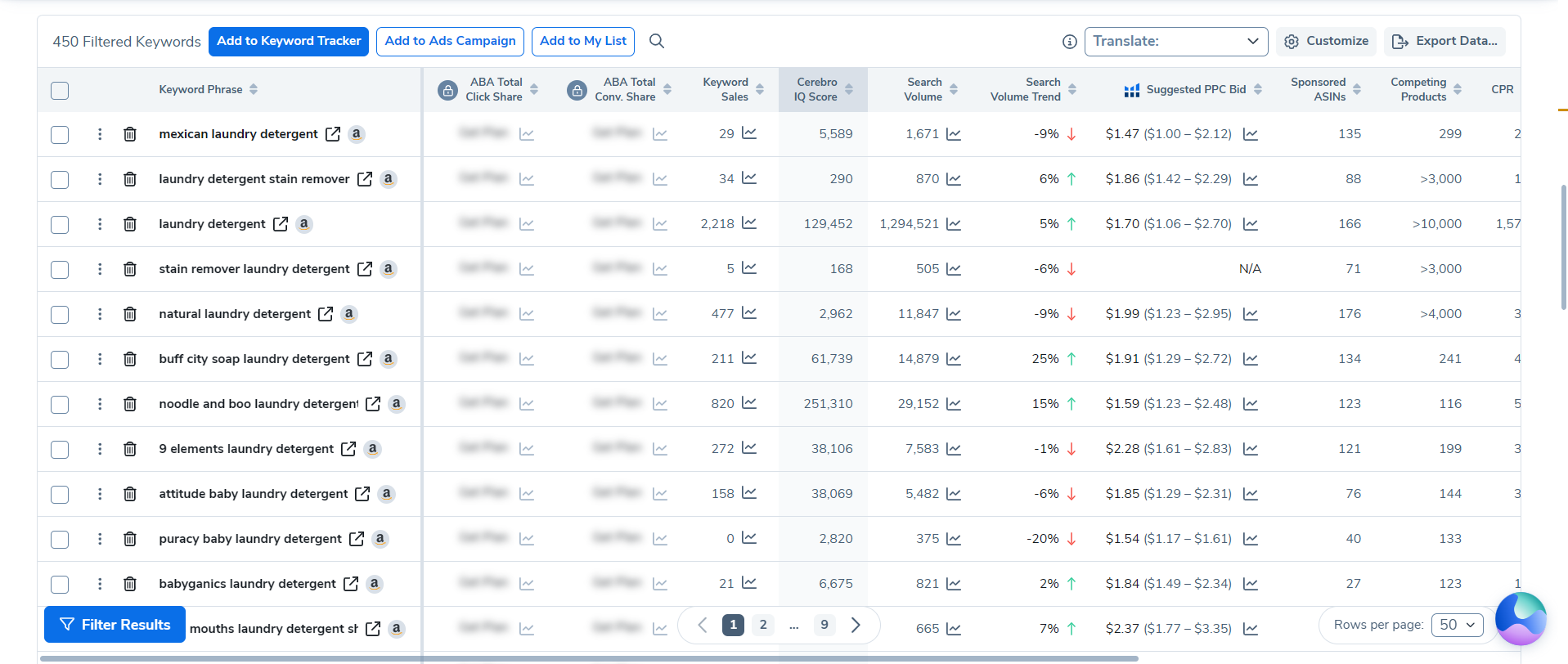
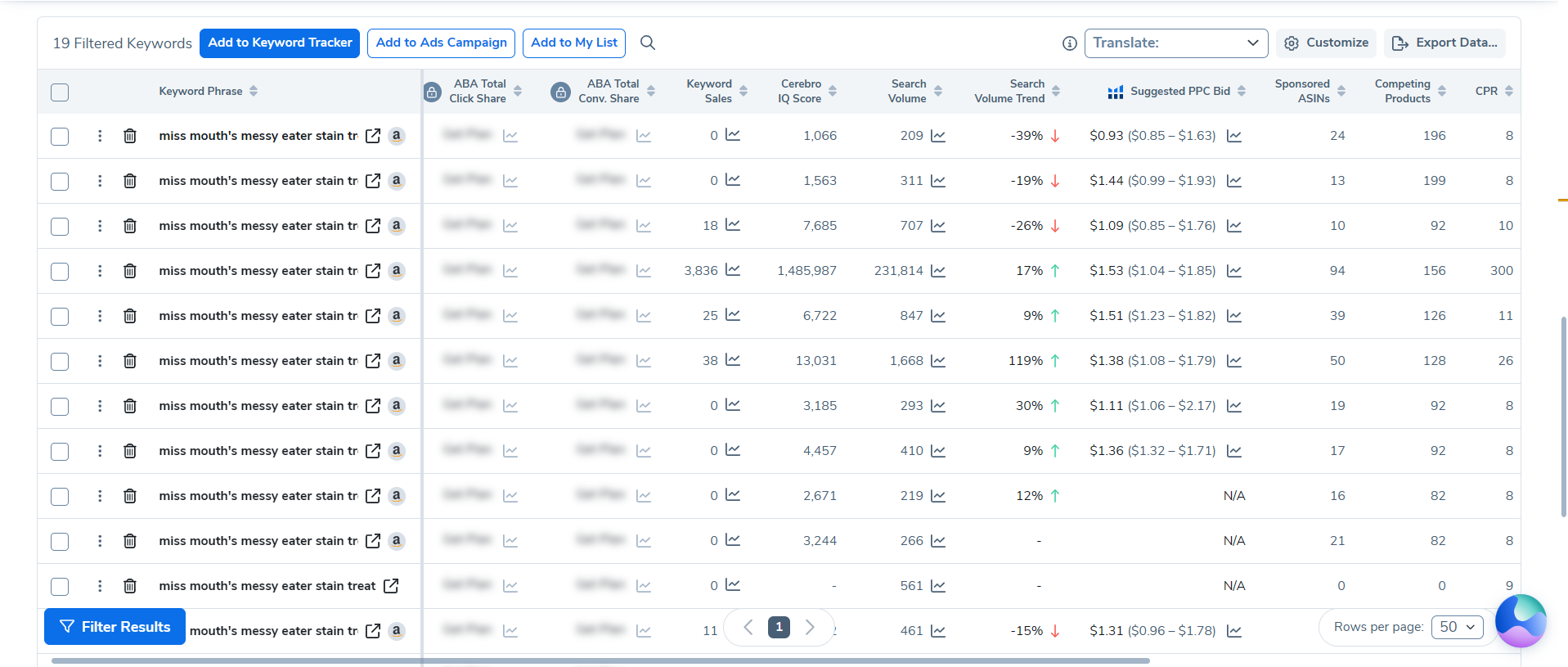
These matches support the conclusion that the connector returned genuine Helium 10 data in the checked examples. They do not verify every keyword row, the completeness of a result set or general search-volume accuracy. We did not separately evaluate Magnet in this session.
Listing Analyzer
We tested Listing Analyzer on B0FJMPHMBN, Miss Mouth’s Messy Eater Stain Treater. The captured analysis included LQS, price, review count, sales history, BSR history and the separate parent-versus-ASIN metrics.
This was the decisive native cross-check for the product-research output: the same number could be found in the tool, but under a more specific label. The metric comparison below shows why looking at the original table matters.
LQS and the sales / BSR displays are tool-reported indicators, not evidence that we improved a listing or verified an individual seller’s performance. Listing Builder was visible in the wider interface, but we did not test a completed listing-optimization outcome.
Helium 10 MCP + ChatGPT: our hands-on test
Setup and connection
We found Helium 10 in ChatGPT’s Plugin Directory and connected it successfully through the permission flow. This is the MCP / plugin workflow documented in our evidence pack.
Live Product Research inside ChatGPT
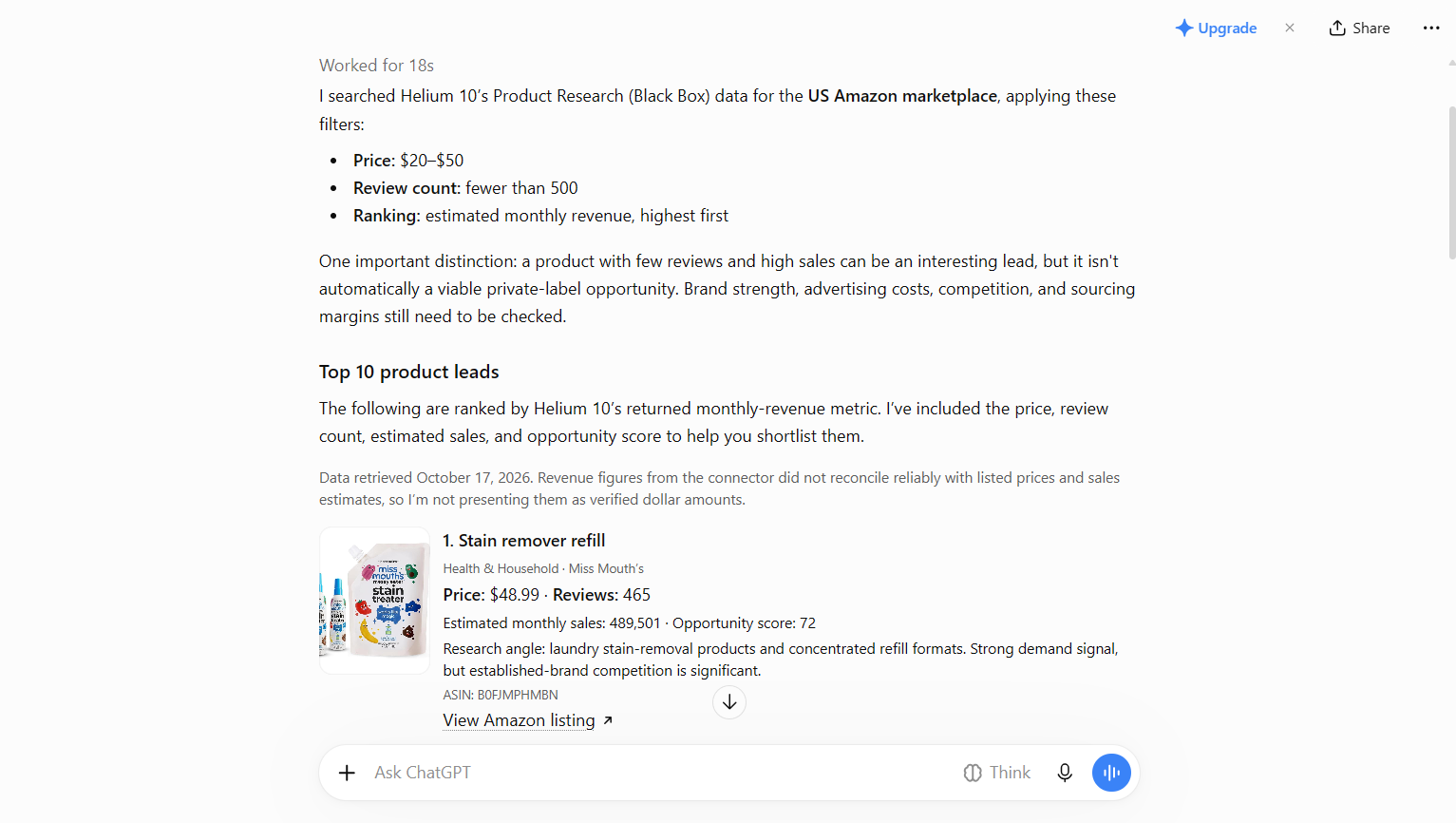
With Helium 10 enabled, we ran product research inside ChatGPT. The response described an Amazon US search using $20–$50 prices and fewer than 500 reviews, and returned product leads with research details. We compared that conversational workflow with native Black Box; we did not treat the shortlist as buying advice or validate all returned values.
Live reverse-ASIN / keyword research
We also ran a reverse-ASIN query through the connected chat and received keyword results with search volumes and other research columns. We then checked the two keyword examples above in Cerebro instead of assuming the whole conversational table was accurate.
Helium 10’s setup and capability pages describe broader AI integrations and research functions. Those are vendor-described capabilities; our hands-on finding is limited to the ChatGPT connection and queries shown here.
What worked well
- A working connection: we connected the plugin and ran both product and keyword research inside ChatGPT.
- Genuine research data in checked examples: the keyword values matched native Cerebro, while the product sales figure was traceable to a native parent-level metric.
- Native tools for follow-up: Black Box and Listing Analyzer exposed separate metric columns that let us inspect the conversational output more carefully.
For buyers, the appeal is the combination of conversational exploration and native detail. We did not measure time savings, improvements in seller results or reliability across repeated sessions.
Where the AI connector can blur metric scope
In one concrete product-research response, ChatGPT presented 489,501 as “estimated monthly sales” for the product. Native Listing Analyzer showed the same number under Parent Level Sales, while ASIN Sales were 17,569 for B0FJMPHMBN.
- ChatGPT: “estimated monthly sales”
- 489,501
- Native: Parent Level Sales
- 489,501
- Native: ASIN Sales
- 17,569
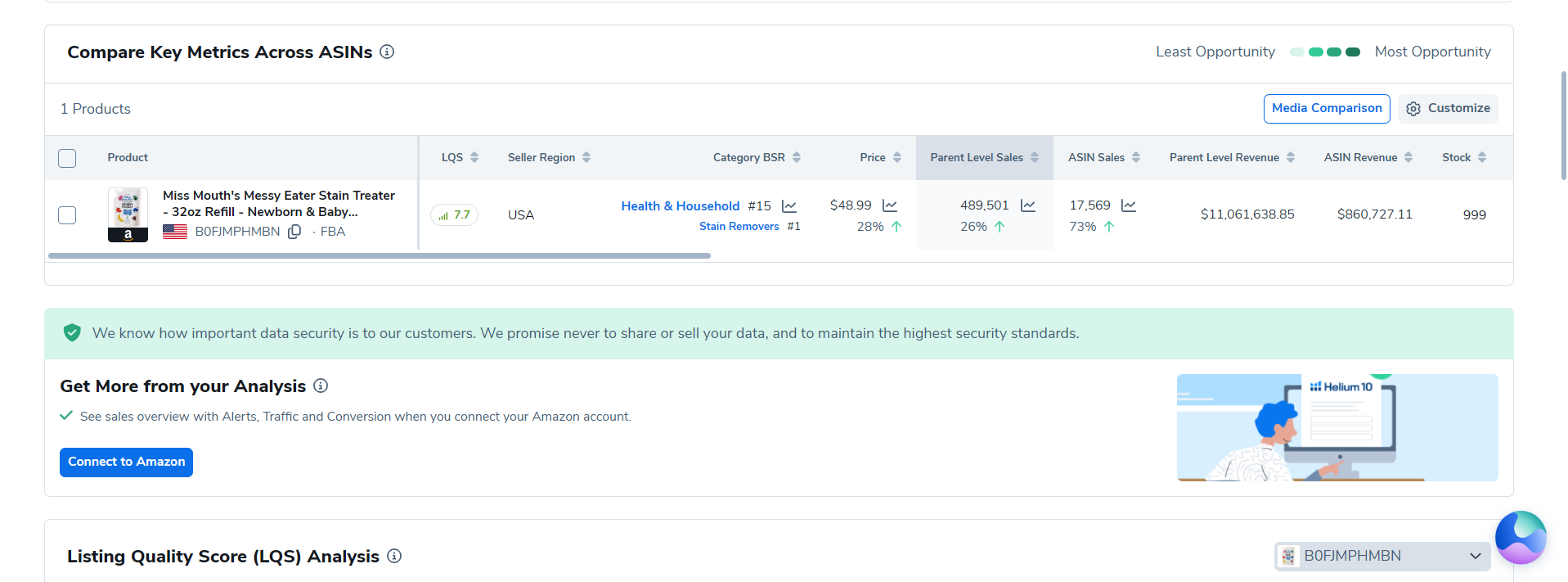
The connector returned genuine Helium 10 data, but the conversational output lost the parent-level versus ASIN-level context in this example. The two numbers are not interchangeable: a parent-level figure should not be read as the sales estimate for the individual tested ASIN.
This finding supports a specific context-loss caveat—not a general claim that the connector is misleading. Before using a result in a sourcing or financial decision, check its original label, scope and marketplace in the native tool. Matching a number is not the same as preserving its meaning.
What we did not test
Market Tracker 360: it was visible in the suite, but opened a “Book a Demo” landing page rather than an accessible dashboard on our account. We did not test its analysis or performance, and the landing page does not establish what access another buyer will receive.
We did not independently test other advertised AI integrations, all Black Box or Cerebro results, a separate Magnet workflow, completed listing optimization, advertising, inventory, refunds, seller-account operations, or end-to-end TikTok and Walmart workflows. We did not evaluate training outcomes or long-term performance.
Visible menus, onboarding screens, marketing claims and sample-data demos show what Helium 10 presents; they do not demonstrate that those workflows worked for us. Confirm required account connections, usage allowances and specific feature access with the vendor before buying.
Pricing and Helium 10 coupon context
The subscription screenshot from October 17, 2026 showed Diamond at $359/month. It also showed cancellation confirmed for October 17, 2026 and a Reactivate button. These are account observations; they do not establish universal current pricing, the reason for cancellation or equivalent access on other accounts.
Check current plan prices, usage allowances, feature access, billing period and renewal terms before choosing. Evaluate the full subscription cost against the research you actually need, not just the introductory discount.
Toolessence partner offers
The existing Toolessence partner links and codes are below. We did not test redemption in this hands-on session; eligibility, availability and terms must be confirmed at checkout.
20% off 6 months
Best for: Sellers who want a stronger upfront discount while testing Helium 10 seriously.
Use TOOLESSENCE2010% off lifetime
Best for: Sellers who prefer a longer-term discount structure, where applicable.
Use TOOLESSENCE10Who should buy Helium 10?
Based on the tested research workflow, consider Helium 10 if several of these needs apply:
- Amazon sellers who regularly combine product discovery, reverse-ASIN keyword research and listing analysis
- Operators who want native research tables as well as conversational access to Helium 10 data
- Buyers willing to check metric definitions, marketplace context and plan access before acting on a shortlist
Who should be cautious?
- Occasional researchers who only need one narrow feature and cannot justify a broad subscription
- Buyers expecting an AI-generated shortlist to establish profitability or product-market fit
- Sellers choosing primarily for untested channels or tools without confirming access and suitability first
Our recommendation is conditional: identify the tools you will use, confirm access and limits, and decide whether their combined value justifies the cost. A broader interface can also mean more concepts and metric definitions to learn.
Final verdict
The October 17 session supports a measured positive assessment of the tested research workflow. Native Black Box, Cerebro and Listing Analyzer let us explore products, inspect keywords and check metric context. The ChatGPT connection worked and returned genuine Helium 10 data in our checked examples.
The important qualification is interpretation: one product response retained a real figure but lost its parent-versus-ASIN label. That makes native verification part of the workflow, not an optional extra when an estimate will affect a buying decision.
Consider Helium 10 if you need these research tools together and will use them carefully. Do not buy solely for a coupon, an AI-generated product recommendation or an untested feature such as Market Tracker 360. This focused review is not an endorsement of every tool, marketplace or plan.
Frequently asked questions
What did Toolessence personally test in Helium 10?
On October 17, 2026, we connected Helium 10 through ChatGPT’s Plugin Directory, ran product-research and reverse-ASIN queries, spot-checked keyword values in native Cerebro, tested Black Box with Amazon US filters, and used Listing Analyzer on ASIN B0FJMPHMBN. This was a focused session, not a test of every tool or marketplace.
Did the Helium 10 ChatGPT connector return real data?
In our test it returned genuine Helium 10 data: specific keyword values matched native Cerebro. One product-research response lost metric scope, presenting 489,501 as estimated monthly sales without retaining its parent-level context. These spot checks do not establish universal accuracy.
What is the difference between Parent Level Sales and ASIN Sales in this test?
For B0FJMPHMBN, native Listing Analyzer showed Parent Level Sales of 489,501 and ASIN Sales of 17,569. The first figure applies at parent level; the second applies to the tested ASIN. They are not interchangeable, and both are tool estimates rather than verified seller sales.
Did you test Market Tracker 360?
No. It was visible in the suite, but opened a Book a Demo landing page rather than an accessible dashboard on our account. We cannot assess its performance from this session.
How much did the tested Helium 10 account cost?
The account screenshot showed Diamond at $359/month on October 17, 2026, with cancellation confirmed and a Reactivate button. This is observed account pricing, not a guarantee of current pricing or access for other buyers. Check the vendor’s current plan terms before subscribing.
What is the Toolessence Helium 10 coupon code?
Toolessence readers can try TOOLESSENCE20 for 20% off 6 months or TOOLESSENCE10 for 10% off lifetime, where applicable. We did not test coupon redemption in this session. Availability, eligibility and terms may change; verify the final discount at checkout.
Does Helium 10 support TikTok and Walmart?
We observed TikTok and Walmart workspaces in the interface, but did not test their end-to-end seller workflows. Confirm the specific tools, marketplace coverage and account requirements you need rather than assuming equivalent access or capability across channels.
Is Helium 10 worth buying with a discount?
It is worth considering if you will use several of the research workflows we tested and are comfortable cross-checking estimates in the native tools. A coupon does not establish business value, profitability or marketplace success. Compare the full subscription cost and required access with your actual workflow.